Hey there, productivity enthusiasts! If you’re looking to boost your office efficiency and manage your time like a pro, then you need to dive into the world of smart calendars. These digital wonders have revolutionized the way we organize our days, making it easier than ever to keep track of meetings, deadlines, and personal commitments. Let’s explore how smart calendars can transform your workspace and why they’re a must-have for modern professionals。
The Struggle with Traditional Calendars
We’ve all been there: frantically searching for a pen to jot down a meeting time on a paper calendar, or scrolling through endless emails to find the right date and time for a call. Traditional calendars, whether paper or basic digital versions, can be clunky and inefficient. They often require manual updates, and coordinating with others can be a headache. Plus, they don’t offer much in the way of flexibility or integration with other tools.
How Smart Calendars Change the Game
Smart calendars leverage the power of AI and automation to streamline your scheduling process. They can automatically schedule and reschedule events based on your habits and preferences, ensuring that you always have the best possible use of your time。These calendars integrate seamlessly with your existing tools, like Google Calendar or Microsoft Outlook, and offer features that make managing your time a breeze。
Key Features to Look For
- Calendar Integration: Sync with your existing calendar apps for a seamless experience.
- Automated Scheduling: Let the AI handle the heavy lifting by automatically finding the best times for meetings.
- Smart Meeting Tools: Features like buffer time between meetings and travel time calculations ensure you’re always on time.
- Notifications and Reminders: Stay on top of your schedule with timely alerts。
l My Top Picks for Smart Calendars
1. Sunsama
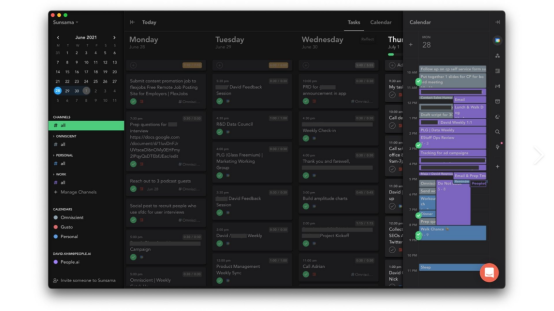
Sunsama is a powerhouse for planning your day. It integrates with Gmail and turns emails into tasks, making it perfect for those who live in their inbox. The AI suggests the best times for tasks based on your work patterns, ensuring you stay productive throughout the day。
2. Reclaim AI
Reclaim AI is all about optimizing your schedule. It analyzes your calendar and to-do list to automatically block out focus time and schedule meetings. The integration with Google Calendar and Slack makes it a perfect fit for modern workflows。

3. Fantastical
Fantastical is a visually appealing calendar app with robust scheduling tools. It uses natural language processing to create events and offers smart suggestions for meeting times. The travel time and weather forecasts are added bonuses for those always on the go。

Tips for Maximizing Your Smart Calendar Experience
Sync Across Devices
Make sure your smart calendar is synced across all your devices, so you can access your schedule from anywhere.
Customize Notifications
Set up custom notifications to remind you of important meetings and deadlines. This way, you’ll never miss a beat.
Regularly Review Your Calendar
Take a few minutes each week to review your calendar and make adjustments. This helps you stay on top of your schedule and ensures you’re making the most of your time.
Wrapping Up
Smart calendars are more than just a convenient tool; they’re a necessity in today’s fast-paced work environment. They help you manage your time efficiently, reduce stress, and keep you organized. Whether you’re a busy executive, a project manager, or a freelancer, a smart calendar can be your ultimate productivity partner. I hope this guide has inspired you to give one a try. If you have any tips or experiences to share, drop them in the comments below. Let’s keep the conversation going and make every day more productive!
Related Posts

The Elegance of Steel: Rediscovering the Power of Fountain Pens in the Modern Office
In the fast-paced, digital-centric world of modern offices, it's easy…

Upgrade Your Workspace: The Power of Quality Office Supplies
Hey, productivity seekers! Whether you’re working from home or in…

How to achieve green office practices using smart office tools
In today's world, with increasing global environmental awareness, green office…